
Phone: +91 81307 87194
Quick Answer
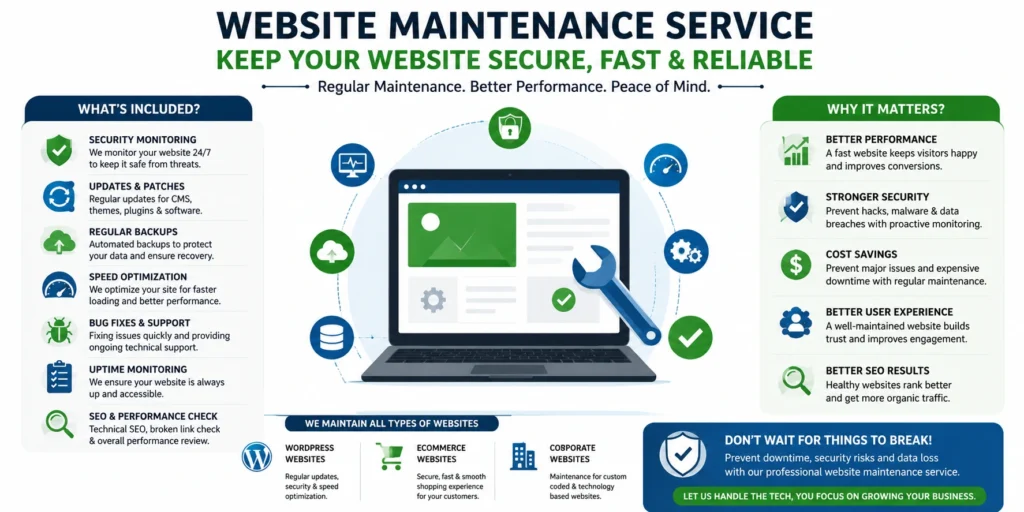
A website maintenance service in India typically covers security monitoring, software and plugin updates, backups, speed optimization, bug fixes, and uptime monitoring, so a website keeps working reliably after launch. Businesses need it because websites degrade over time – through outdated software, security threats, and broken functionality – even when nobody’s actively changing anything on the site.
Imagine a growing Delhi-based apparel brand launching a festive-season sale. Traffic spikes, checkout starts throwing errors, and by the time the team notices, an hour of potential orders has quietly disappeared. Nothing dramatic happened – no one attacked the site, and no one intentionally changed anything. An outdated plugin simply stopped working properly with the payment gateway, and nobody was monitoring the issue closely enough to catch it before customers were affected.
This is the kind of problem a website maintenance service in India is designed to help prevent. It’s not glamorous work, and businesses rarely notice it when everything is running smoothly – but the consequences become very clear when regular maintenance is ignored. This guide explains what website maintenance actually involves, what affects its cost, and how to decide what level of ongoing support your business website needs.
Table of Contents
Why Website Maintenance Is More Important Than Most Businesses Think
There’s a meaningful difference between having a website and maintaining one. A website that was built well two years ago and hasn’t been touched since isn’t necessarily still working well today – software ages, threats evolve, and small issues compound quietly in the background.
The risks that build up without regular attention include:
- Security vulnerabilities. Outdated CMS versions, themes, and plugins are the most common entry point for website attacks – not sophisticated hacking, just known vulnerabilities left unpatched.
- Slowing performance. Unoptimized images, database bloat, and accumulated plugins gradually drag down load times, often without an obvious single cause.
- Broken pages and forms. A payment gateway update, a browser update, or a third-party API change can silently break a form or checkout flow that worked fine last month.
- Outdated plugins and software. Every unpatched plugin is a small, growing liability, particularly on WordPress sites where plugin conflicts are common.
- Backup failures. Many businesses only discover their backup system wasn’t actually working the day they need to restore something.
- SEO problems. Broken links, slow pages, and crawl errors erode search visibility gradually, often going unnoticed until traffic has already dropped.
- Poor user experience. Small accumulated friction – a slow page here, a confusing error there – pushes visitors toward a competitor’s site without a single dramatic failure.
None of these happen overnight. That’s exactly what makes them easy to ignore until the cost of ignoring them becomes obvious.
What Does a Website Maintenance Service in India Include?
The specific scope varies by website and plan, but a comprehensive website maintenance service in India generally covers:
- Website security monitoring – watching for suspicious activity, failed login attempts, and known vulnerability patterns.
- CMS, theme, and plugin updates – keeping the software layer current without breaking existing functionality.
- Regular backups – automated, tested backups stored separately from the live server.
- Website speed optimization – image compression, caching, and code cleanup to keep load times reasonable.
- Broken link checking – finding and fixing links that quietly stop working over time.
- Uptime monitoring – alerting someone the moment the site goes down, rather than waiting for a customer complaint.
- Malware scanning – regular checks for injected code or compromised files.
- Database optimization – cleaning up bloated tables and revisions that slow down dynamic sites.
- Bug fixes – resolving functional issues as they’re identified, not letting them accumulate.
- Form and functionality testing – checking that contact forms, checkout flows, and interactive elements actually still work.
- SSL certificate monitoring – making sure certificates renew before they expire and break the site’s security indicator.
- Content and image updates – smaller content changes handled as part of an ongoing plan.
- Technical SEO maintenance – fixing crawl errors, broken redirects, and indexing issues as they appear.
Not every plan includes every item on this list, and not every website needs all of them. A five-page brochure site and a high-traffic eCommerce store have genuinely different maintenance needs, which is worth discussing directly with whoever manages the site.
Common Website Problems Businesses Face Without Regular Maintenance
The consequences of skipped maintenance look different depending on the type of website involved.
WordPress websites are especially exposed to plugin conflicts. A theme update that isn’t tested against installed plugins can break page layouts overnight, and outdated plugins remain one of the most common ways WordPress sites get compromised.
eCommerce stores feel maintenance gaps directly in revenue. A payment gateway integration that silently breaks, or a cart that stops syncing with inventory, translates immediately into lost orders – often before anyone on the team notices.
Corporate websites tend to accumulate broken links and outdated content quietly. A leadership page listing someone who left two years ago, or a services page referencing a discontinued offering, chips away at credibility with visitors doing due diligence before reaching out.
Service-based business websites often lose leads through broken contact forms. A form that stops sending emails after a hosting migration can go unnoticed for weeks – every visitor who tried to reach out during that window is simply gone.
Custom-coded websites carry a different risk: fewer automated update prompts mean issues can sit undetected longer, since there’s no plugin dashboard flagging an available patch the way there is on WordPress.
Website Maintenance vs Website Development
These get confused often enough that it’s worth spelling out clearly.
| Factor | Website Development | Website Maintenance |
| Purpose | Building a new website or a major redesign | Keeping an existing website secure, functional, and up to date |
| Frequency | One-time project (or occasional major updates) | Ongoing – daily, weekly, or monthly, depending on the plan |
| Type of work | Design, coding, new features, structural changes | Updates, monitoring, backups, bug fixes, small content changes |
| Cost structure | Typically a fixed project cost | Usually a recurring monthly or annual plan |
| Examples | Building a new eCommerce store from scratch | Updating plugins, fixing a broken form, restoring from backup after an issue |
A website launch is the beginning of its lifecycle, not the end of the project. Treating development and maintenance as the same one-time expense is one of the more common planning mistakes businesses make.
Types of Website Maintenance Services
WordPress Website Maintenance
WordPress sites need frequent core, theme, and plugin updates, tested carefully before pushing live, since a single incompatible plugin update can break page layouts or functionality across the entire site.
eCommerce Website Maintenance
Online stores need close attention to payment gateway integrations, inventory sync, cart functionality, and page speed – since even brief downtime during a sale directly costs revenue, not just visibility.
Corporate Website Maintenance
Business and institutional websites typically need less frequent technical attention but benefit from regular content review, broken link checks, and periodic security updates to maintain credibility and accuracy.
Custom Website Maintenance
Custom-coded websites need a maintenance partner familiar with the specific codebase, since generic maintenance checklists don’t always map cleanly onto a bespoke build – issue tracking and manual code review matter more here than automated plugin updates.
Website Security Maintenance
This spans all website types – regular vulnerability scanning, firewall configuration, login monitoring, and a tested incident response plan for when something does go wrong, since even well-maintained sites occasionally face attempted attacks.
How Regular Website Maintenance Improves Business Results
A website maintenance service in India consistently supports outcomes that are easy to underappreciate until they’re missing:
- Reduced downtime – fewer unexpected outages, and faster recovery when something does go wrong.
- Better website speed – pages that load quickly stay more pleasant to use as content and traffic grow.
- Improved security – a smaller window of exposure to known vulnerabilities.
- Fewer technical issues – problems caught and fixed before they affect visitors, not after.
- Better user experience – fewer broken links, fewer errors, smoother navigation.
- More reliable lead generation – forms and contact points that consistently work as expected.
- Improved website stability – a site that behaves predictably as it’s used and updated over time.
- Protection of business data – tested backups and monitoring reduce the risk of permanent data loss.
None of this guarantees specific traffic or ranking outcomes on its own – maintenance supports a healthy website, but growth still depends on the broader business and marketing effort behind it.
Website Maintenance Checklist
Weekly Tasks
- Check uptime monitoring alerts and resolve any flagged downtime
- Review security scan results for suspicious activity
- Verify recent backups completed successfully
- Test critical forms (contact, checkout, signup)
Monthly Tasks
- Update CMS, themes, and plugins after testing on a staging environment
- Run a broken link check across key pages
- Review page load speed and address any regressions
- Check SSL certificate status and renewal dates
- Review and respond to any accumulated bug reports
Quarterly Tasks
- Full database optimization and cleanup
- Deeper security audit, including user access review
- Review and refresh outdated content or images
- Technical SEO review – crawl errors, redirects, indexing status
- Test full backup restoration process, not just backup completion
Website Maintenance Service in India: Cost Factors
There’s no single honest number for “website maintenance cost” without understanding the specific website. While prices vary widely, businesses should be cautious about choosing a maintenance plan based only on the lowest monthly cost. A cheaper plan may cover only basic updates, while security monitoring, emergency support, backup restoration, performance optimization, and custom bug fixes may be charged separately.
Pricing depends on:
- Website size – a five-page site costs less to maintain than one with hundreds of pages.
- CMS or technology – WordPress maintenance differs in scope from a custom-coded application.
- Number of pages – more pages generally means more surface area to monitor and update.
- Plugin and integration complexity – more third-party integrations mean more potential points of failure to watch.
- eCommerce functionality – stores need more frequent, more careful maintenance than static informational sites.
- Security requirements – sites handling sensitive data need more robust, proactive security monitoring.
- Frequency of updates – daily monitoring costs more than a monthly maintenance check-in.
- Emergency support requirements – guaranteed rapid response for critical issues typically costs more than standard-hours support.
- Custom development needs – ongoing feature work beyond basic maintenance is usually scoped and priced separately.
Rather than choosing the cheapest available plan, it’s worth matching the plan to what the website actually needs – an active eCommerce store carrying real transaction risk needs a meaningfully different level of attention than a static five-page brochure site, even if both technically fall under “website maintenance.”
How to Choose the Right Website Maintenance Company in India
A few practical checks matter more than a polished sales pitch when comparing a website maintenance service in India:
- Experience with your specific technology. A team that regularly works with WordPress isn’t automatically equipped to maintain a custom Laravel application, and vice versa.
- A clearly defined maintenance scope. Ask exactly what’s included – vague language like “full support” without specifics is a signal to ask more questions.
- A tested backup and recovery process. Ask when they last actually tested restoring a backup, not just whether backups run.
- Documented security practices. Firewall configuration, monitoring, and a clear incident response plan should be explainable in specific terms.
- Realistic response time commitments. Get response time expectations in writing, particularly for anything labeled “emergency support.”
- Transparent reporting. Regular updates on what was checked, updated, or fixed – not just a monthly invoice with no detail behind it.
- Available technical support, not just automated update scripts running unmonitored in the background.
- Clear communication, especially around what happens if an update breaks something on the live site.
Warning signs worth taking seriously: vague scope with no written detail, no backup testing history, guaranteed uptime numbers with no explanation of how they’re achieved, and reluctance to explain what a typical maintenance cycle actually involves.
DIY Website Maintenance vs Professional Website Maintenance
| Factor | DIY Maintenance | Professional Maintenance |
| Time required | Significant, ongoing owner time | Handled by a dedicated team |
| Technical expertise needed | Requires hands-on technical comfort | Covered by the provider’s expertise |
| Update testing | Often skipped due to time constraints | Typically tested before going live |
| Security monitoring | Usually reactive, after something breaks | Usually proactive and continuous |
| Best suited for | Very small, simple, low-traffic sites | Active business, eCommerce, and higher-traffic sites |
DIY maintenance can work reasonably well for a very small site with minimal traffic and a technically comfortable owner willing to check in regularly. It tends to become risky once a website starts generating real business – leads, sales, or brand reputation – since the cost of a missed issue grows alongside the website’s importance to the business.
Common Website Maintenance Mistakes
- Updating plugins without a backup first. A failed update without a recent backup can turn a small issue into a full site outage.
- Ignoring small errors. A minor console error or a slightly broken layout often signals a larger underlying issue building up.
- Using outdated software long past its support window. Unsupported versions stop receiving security patches entirely.
- Not testing forms regularly. A form can silently stop sending emails while still displaying a “success” message to visitors.
- No uptime monitoring. Without it, the first sign of an outage is often a customer complaint, not an internal alert.
- Ignoring website speed until it’s clearly bad. Performance tends to degrade gradually, so it’s easy to miss until visitors start noticing.
- Delaying security updates. Waiting to patch a known vulnerability significantly increases the window of exposure.
- Not having a recovery plan. Knowing exactly what to do – and who to call – during an outage matters as much as preventing one.
Why Website Maintenance Matters for SEO
Maintenance supports SEO indirectly but meaningfully, through several mechanisms:
- Page speed – faster pages tend to perform better in both rankings and user retention.
- Crawlability – a technically healthy site is easier for search engines to crawl and index properly.
- Broken link management – fixing broken internal and external links protects both user experience and crawl efficiency.
- Mobile usability – ongoing testing catches mobile display issues that can otherwise persist unnoticed.
- Technical issue monitoring – catching server errors or broken pages before they affect a meaningful share of visits.
- HTTPS and security – a valid, current SSL certificate is a baseline expectation for both users and search engines.
- Indexing health – regular checks catch pages accidentally blocked from indexing before it costs meaningful traffic.
Maintenance alone doesn’t guarantee rankings – content, backlinks, and overall SEO strategy still do most of that work – but a technically neglected site makes everything else in an SEO strategy harder to sustain.
How Often Should a Website Be Maintained?
This depends on the type of website and how much is riding on it:
- Small business websites with low traffic can often work with monthly maintenance check-ins, alongside basic automated security monitoring.
- Active business websites generating regular leads typically benefit from weekly monitoring and monthly update cycles.
- eCommerce websites generally need continuous monitoring, given the direct revenue impact of even short technical issues.
- High-traffic websites usually need the most frequent attention, since problems affect a larger number of visitors before anyone notices manually.
Security monitoring and backups are usually the exception across all categories – these tend to need continuous or daily attention regardless of overall site size, since the cost of a missed security issue or a failed backup rarely scales down just because the site is small.
Where Bhoomi Techzone Fits In
Bhoomi Techzone Pvt. Ltd. provides a website maintenance service in India for businesses running WordPress sites, custom-built applications, and eCommerce stores across the country. The approach generally starts with understanding a website’s current condition – what’s outdated, what’s at risk, and what’s already working fine – before prioritizing critical issues and setting up an ongoing maintenance plan matched to the site’s actual traffic and complexity.
Beyond maintenance, the team also works on website development, software development, IT support services, and SEO services – useful when a maintenance review surfaces issues that go beyond routine upkeep, like a site that needs a deeper technical rebuild or an SEO recovery plan.
Frequently Asked Questions
Q1. What is included in a website maintenance service?
A website maintenance service in India typically includes security monitoring, software and plugin updates, backups, speed optimization, bug fixes, uptime monitoring, and periodic content updates – though the exact scope depends on the specific plan and website.
Q2. How much does website maintenance cost in India?
Cost depends on website size, technology, complexity, and how frequently the site needs monitoring. A simple brochure site costs meaningfully less to maintain than an active eCommerce store with multiple integrations.
Q3. How often should a website be maintained?
It varies by site type – monthly check-ins can work for small, low-traffic sites, while active business and eCommerce websites generally need weekly or continuous monitoring, especially for security and backups.
Q4. Do small businesses need website maintenance?
Yes. Even a simple website accumulates security risk over time through outdated software, regardless of how much traffic it gets.
Q5. Is website maintenance necessary for WordPress websites?
Yes, arguably more so than other platforms, since WordPress’s plugin ecosystem creates more frequent update and compatibility issues than a simpler, more static setup.
Q6. What happens if plugins are not updated?
Outdated plugins become known security vulnerabilities and can also cause compatibility issues with other plugins, themes, or the core CMS as those components update independently.
Q7. Does website maintenance improve SEO?
It supports SEO indirectly, through better page speed, crawlability, and fewer technical errors – but maintenance alone doesn’t replace an actual content and SEO strategy.
Q8. Can website maintenance reduce security risks?
It significantly reduces the risk by closing known vulnerabilities and catching suspicious activity early, though no maintenance plan can guarantee a website will never face an attempted attack.
Q9. What is the difference between website hosting and maintenance?
Hosting is the server infrastructure that keeps a website online; maintenance is the ongoing work of updating, securing, and fixing the website itself. A website can have excellent hosting and still be poorly maintained, or vice versa.
Q10. Do eCommerce websites require more maintenance?
Generally yes, given the added complexity of payment gateways, inventory systems, and the direct revenue impact of even brief technical issues.
Q11. Can I maintain my website myself?
For a very small, simple site, yes – if you’re comfortable with the technical side and willing to check in regularly. As a website grows in traffic or business importance, professional maintenance usually becomes more practical than owner time alone.
Q12. How do I choose a website maintenance company in India?
Check their experience with your specific website technology, ask for a clearly defined scope of work, confirm their backup and recovery process, and look for transparent, regular reporting rather than a vague monthly invoice.
Final Thoughts
A website shouldn’t be treated as a one-time project that’s finished the day it launches. Regular maintenance helps businesses protect that investment, reduce the chance of unexpected technical problems, and keep the site reliable as traffic, features, and business needs grow over time.
If you’re evaluating a website maintenance service in India for your business, it’s worth starting with an honest look at your site’s current condition – what’s outdated, what’s at risk, and what actually needs attention. Get in touch with Bhoomi Techzone for a straightforward website health check and maintenance plan matched to your specific site.
Written by: Bhoomi Techzone Content Team,
Reviewed by: Technology & Digital Solutions Team, Bhoomi Techzone Pvt. Ltd.
Company: Bhoomi Techzone Pvt. Ltd
Phone: +91 81307 87194
Address: A-43, A Block, Sector 63, Noida, Uttar Pradesh 201301
Website: https://bhoomitechzone.com/